|
Open Composer
Choose Edit from the Main Menu
Choose Mail/News Account Settings from the Edit Menu
Click the New Account button at the bottom left corner of
the screen
Select ISP or email provider
Click Next
In the Your Name: field, type your full name
In the Email Address: field, type your full email address
(ex. yourName@yourDomain.com)
Click Next
The Server Type: is POP Mail Server
The Server Name: is primaryhubmail.com
Click Next
In the User Name: field, type your full email address using
% instead of @
(ex. yourName%yourDomain.com)
Click Next
In the Account Name: field, type primaryhubmail.com
Click Next
Click Finish
(note: if your primaryhubmail account is already listed on
the left, as shown below, or you enter any incorrect information,
you will have to click on the account name and then click the "delete"
button in the lower right and go back through the process of adding
an account) 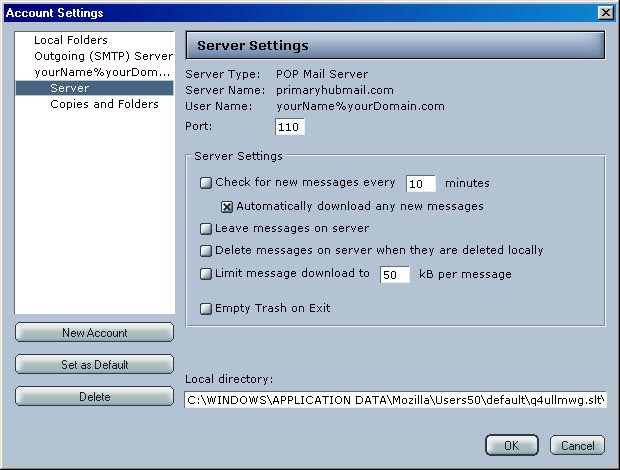
|